
Welcome To Xeno Executor
Xeno Executor is a powerful tool designed for executing custom scripts within Roblox games. It enables users to inject and run Lua scripts, allowing for the modification of gameplay dynamics and the automation of specific actions within the Roblox environment.

Over the past decade, the gaming industry has rapidly advanced, becoming one of the most captivating sectors in technology. With new games and characters coming into the gaming world regularly, the competition in gaming continues between giants. However, beyond traditional gaming, some platforms prioritize enhancing the user experience by fostering creativity and innovation.
One example is Roblox, which empowers users to create multiple games and characters. Roblox sets the record for engagement hours in billions every month. Hence, to enhance gameplay, gamers use exploits like Fluxus, Synapse, and Delta. Among those, Xeno Executor is the most popular these days in terms of script execution.
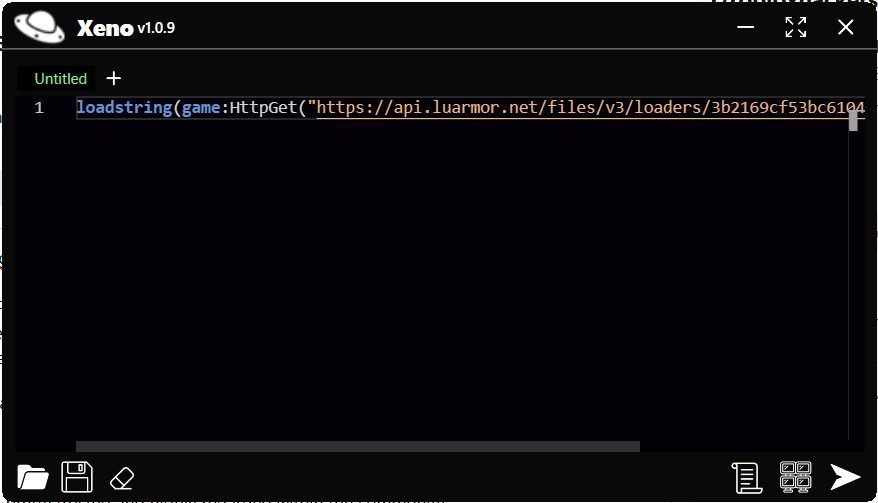
What is Xeno Executor?
Xeno Executor is a powerful and free script executor designed for Roblox on Windows. It allows users to run custom scripts for improved gameplay experiences. With lightning-fast script execution, it has achieved a 75% success rate in UNC testing, showcasing its reliability and efficiency. Xeno Executor allows players to take complete control of their Roblox experience by offering powerful tools for executing advanced scripts and unlocking new gameplay possibilities.
Features of Xeno Executor
Built-In Script Hub
The executor features a ready-to-use repository of pre-made scripts, enabling hacks like auto-farming, infinite resources, speed boosts, god mode, teleportation, and more which are available for quick execution.
Unlock Powerful Cheats
Gain an edge in games by enabling features including unlimited currency, enhanced speed, invincibility, and bypassing developer restrictions to unlock hidden areas and exclusive items.
Game Customization
Modify in-game elements, including character appearances, animations, and special effects, for a personalized gaming experience that stands out.
Task Automation
Automate repetitive in-game activities, such as resource farming or grinding, using Xeno’s advanced automation capabilities. Its robust DLL injection system ensures scripts are embedded securely and effectively.
How does Xeno Executor Work?
Numerous scripts are implemented by developers to inject into games. Lua Scripting is the language we use to write and execute scripts in Roblox. With this, we can unlock the premium features of any Roblox game. Speed and Jump Boost, Aimbot and ESP, Infinite Resources Hacks, Wall Hacks, Anti-AFK Hacks, etc. are some popular hacks we can achieve via writing the scripts in the Xeno Executor.
System Requirements for Xeno Executor
To install the Xeno Executor, make sure your system meets these requirements.
- Operating System: An OS that can be Windows 7, 8, or more with preferred 64-bit.
- RAM: For smooth gameplay, 8GB RAM is required.
- Graphics: Integrated or dedicated GPU with DirectX 9
- Processor: Dual Core processor or more
- Internet: Stables Internet connection for seamless script injection
Installation Guide for Xeno Executor for Windows
Below are the steps to install Xeno Executor on Windows.
- Temporarily Disable Antivirus Software: Turn off your antivirus temporarily before downloading Xeno Executor, as it may mistakenly flag the file as a threat.
- Download the executor file: Go to the official Xeno website: https://xenoexecutor.io/. Download the setup file for Windows and use tools like WinRAR or 7-Zip to extract the ZIP file into a designated folder on your PC.
- Installation: Open the folder and double-click the .exe file to start the installation. Follow the prompts to complete the setup process.
- Connect to Roblox: Launch any Roblox game, and open the .exe file to launch the Xeno Executor.
- Execute Scripts: Write your desired script in the executor or select one from the script hub. Click Execute to implement the changes in the game.
Is Xeno Executor safe?
Using Xeno Executor involves certain risks, and its safety depends on several factors. Always get Xeno Executor from trusted platforms like its official website or Discord to avoid malware risks rather than downloading from unverified or unofficial sources.
How do you load and Execute scripts for Xeno Executor?
Once you have the source file, you will see an Xeno file with a .exe extension. This file is used to write down and execute different Roblox scripts to modify their gameplay. Once you launch the UI, you will see a prompt.
Type the /console to check if Xeno is attached successfully or not. With a script option displayed on the screen, you can search for any game scripts. You can even write the scripts in Lua and inject them into any Roblox game.
How to Keep Xeno Executor Updated?
To keep Xeno Executor updated, uninstall the old version of Xeno Executor and install the latest one. Some Roblox forums or Discord channels may provide alerts on new updates and releases. Stay connected to these communities to stay informed about significant patches or updates.
Avoiding Bans and Staying Undetected?
One of the safest methods is to use Xeno Executor on a secondary Roblox account. Test the scripts in this environment and run those into the main account. Play in private or low-traffic servers where you’re less likely to be reported by other players.
Pros and Cons of Xeno Executor
Xeno Executor is free of cost which makes it accessible for anyone who wants to enhance their Roblox experience without spending money. Works with a wide range of Roblox games, allowing you to enhance your gaming experience across various titles. However, Using Xeno Executor can lead to account bans since it violates Roblox’s Terms of Service.
Xeno Executor vs Other Executors
Xeno Executor offers smooth performance and stability, ensuring minimal lag even when executing demanding scripts. Xeno Executor includes useful features like custom script injection, automation tools, and robust error handling. Some other executors may lack these features or require additional steps to implement them.
Best Alternative to Xeno Executor for Roblox Script Execution
Xeno Executor supports a wide range of Roblox scripts and offers a built-in Script Hub for easy access. Similarly, other executors support similar scripts and can provide the same convenience in managing and storing scripts. Fluxus, Ronix, Delta, and Krnl are some of the known executors on the Internet.
Frequently Asked Questions (F.A.Q’s)
Yes, Xeno Executor is completely free to use. Unlike many other exploit tools, it does not require any kind of purchase or subscription.
Xeno Executor is a popular Roblox exploit tool that allows users to execute custom scripts in Roblox games. Xeno Executor is designed to give players the ability to manipulate game behaviors, gain unfair advantages, or bypass certain game restrictions.
To use Xeno Executor:
1.Download and install the Xeno Executor tool from a Official Website.
2.Launch Roblox and join a game.
3.Open Xeno Executor and click the “Attach” button to connect the exploit to your Roblox session.
4.Once attached, you can execute pre-made scripts or write your own scripts in the script box to use various cheats like teleportation, speed hacks, and more.
To use Xeno Executor:
1.Download and install the Xeno Executor tool from a Official Website.
2.Launch Roblox and join a game.
3.Open Xeno Executor and click the “Attach” button to connect the exploit to your Roblox session.
4.Once attached, you can execute pre-made scripts or write your own scripts in the script box to use various cheats like teleportation, speed hacks, and more.
